 BubbleJournal
How to read a dive profile
By Dmitry Shalimov · Updated October 19, 2026
A dive profile is the graph of your depth through the dive: time along the bottom, depth going down the side. Your dive computer records a depth every few seconds, and the line it draws tells the story of the dive: how fast you went down, how long you stayed deep, how you came up and whether you stopped on the way.
The parts of a dive
- Descent: the first steep drop. A clean descent is a straight line; steps in it are pauses to equalize or wait for a buddy.
- Bottom time: the deepest part of the dive. On a reef it's rarely flat, because you follow the reef up and down.
- Ascent: the climb back up. It should be gentler than the descent, getting slower near the surface.
- Safety stop: a flat stretch at around 5 m (15 ft) for 3 minutes or more, near the end.
- Surfacing: the last few metres, which should be the slowest part of all.
Shapes worth knowing
- Square: straight down, a long flat bottom, straight up. Typical of a wreck or a sandy bottom, and the shape that uses up your no-decompression time fastest.
- Multilevel: deepest first, then shallower and shallower. Most reef dives look like this, and it's the kindest shape for your tissues, because the shallower parts let nitrogen out.
- Sawtooth: repeated ups and downs of several metres. Each climb and drop is a small ascent and descent, often a sign of buoyancy that needs work, or of a profile that followed the bottom too closely.
- Reverse: shallow first, deep later. It isn't wrong in itself, but it's the order training tells you to avoid, because the deep part comes when your body already holds the most nitrogen.
Ascent rate
How fast you come up matters more than how fast you go down. Most training today teaches 9 m (30 ft) a minute or slower, and slower still near the surface. Coming up too fast doesn't give the nitrogen in your body time to leave gently. BubbleJournal works out your ascent rate over each 30 seconds of the dive and marks the stretches of the profile that came up faster than 9 m a minute.
NDL and tissue loading along the line
Each point of the profile has a no-decompression limit and a tissue loading. The NDL is shortest at the deepest point late in the bottom time, and grows again as you come shallower. If a stretch of a dive went past the NDL, BubbleJournal marks it on the profile too.
Temperature
Most computers also record the water temperature. It often shows the thermocline: a sudden drop of a few degrees at a certain depth, where warm surface water sits on colder water below. In a cenote or a lake the temperature can change sharply between layers of water.
A real dive
A cenote dive from my own logbook, at Cenote El Pit, for 52 minutes on air. It's a multilevel profile: straight down to the deepest point, 82 ft, within the first six minutes, a few ups and downs of 10 to 15 ft along the bottom, then a long, slow rise between 40 and 50 ft. The last ten minutes are spent between about 15 and 25 ft, on the way up. No stretch of the climb is marked as too fast.
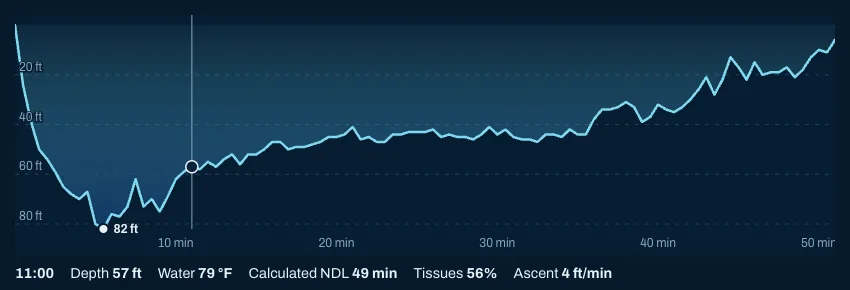
At minute 11, on the way up from the deepest part, the readout shows 57 ft, water at 79 °F, an NDL of 49 minutes, tissue loading at 56% and an ascent of 4 ft a minute, well under the 30 ft a minute limit.
In your logbook
BubbleJournal shows the profile of every dive your computer recorded, whichever brand it was. Move along it, or tap it on a phone, to read the time, depth, water temperature, and the NDL and tissue loading at that moment, both as your computer showed them and as BubbleJournal works them out. Start a free logbook and import your dives to see yours.
More guides
- Air consumption (SAC rate): how to work it out and use it
- No-decompression limit (NDL): what it is and why it changes
- Tissue loading: what the percentage means and how it falls
Which dive computers BubbleJournal reads · Keep your dives in BubbleJournal, free